

Custom axes and general charts
Build numeric line graphs, scatter plots, and categorical bar charts that do not use the market time axis.
Most indicators place values on the chart's time axis. You can also choose your own x-values, such as numbers or category names. Use these charts for distributions, curves, venue comparisons, and dashboards.
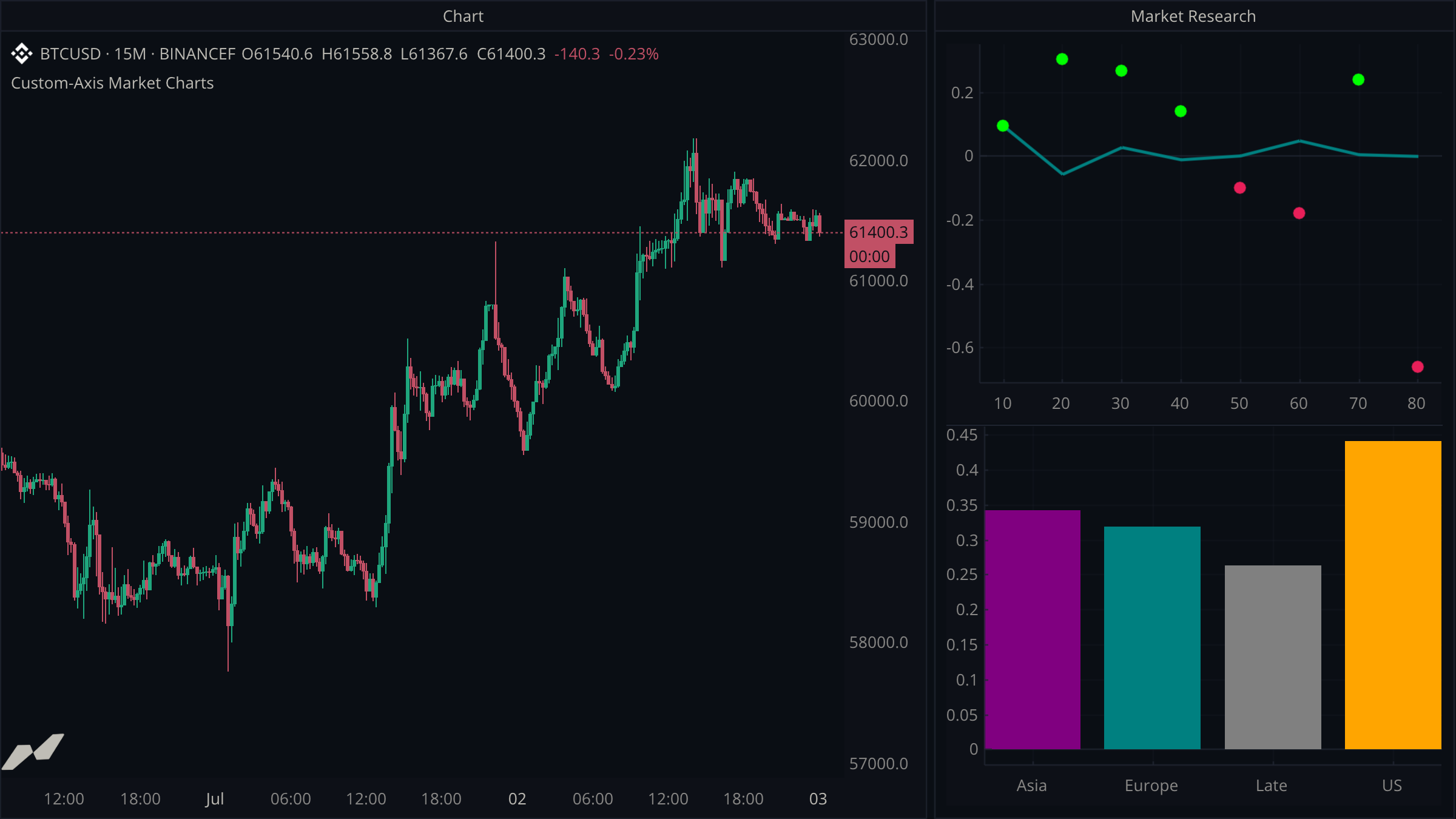
script "Custom-Axis Market Charts"

data chart = subscribe(data.ohlcv)

window research = window(title: "Market Research") {
  response: chart.panel(axis: axis.index, title: "RSI Bucket vs Next-Bar Return"),
  sessions: chart.panel(axis: axis.category, title: "Average Candle Range by Session"),
}

plot (
  averageReturn = plot.line(
    title: "Average Return %",
    color: color.teal,
    width: 2.5,
    on: research.response,
  )
  latestReturn = plot.point(
    title: "Latest Sample",
    color: color.white,
    size: 5.0,
    on: research.response,
  )
  sessionRange = plot.histogram(
    title: "Average Range %",
    color: color.orange,
    on: research.sessions,
  )
)

state (
  returnSums = map<int, float>(10)
  returnCounts = map<int, int>(10)
  rangeSums = map<string, float>(4)
  rangeCounts = map<string, int>(4)
  previousClose: float? = null
  previousBucket: int? = null
)

on chart.close {
  let close = chart.close ?? 0.0
  let prior = previousClose
  let bucket = previousBucket

  if prior != null && prior != 0.0 && bucket != null {
    let sample = (close / prior - 1.0) * 100.0
    let total = (returnSums.get(bucket) ?? 0.0) + sample
    let count = (returnCounts.get(bucket) ?? 0) + 1
    returnSums.set(bucket, total)
    returnCounts.set(bucket, count)
    averageReturn.set(bucket, total / float(count))
    latestReturn.set(
      bucket,
      sample,
      color: sample >= 0.0 ? color.green : color.red,
      size: 5.0,
    )
  }

  let timestamp = chart.time ?? time.fromUnixSeconds(0)
  let hour = time.hour(timestamp)
  let session = hour < 8 ? "Asia" : hour < 13 ? "Europe" : hour < 21 ? "US" : "Late"
  let high = chart.high ?? close
  let low = chart.low ?? close
  let rangePct = close != 0.0 ? (high - low) / close * 100.0 : 0.0
  let rangeTotal = (rangeSums.get(session) ?? 0.0) + rangePct
  let rangeCount = (rangeCounts.get(session) ?? 0) + 1
  rangeSums.set(session, rangeTotal)
  rangeCounts.set(session, rangeCount)
  sessionRange.set(
    session,
    rangeTotal / float(rangeCount),
    color: session == "Asia" ? color.purple : session == "Europe" ? color.teal : session == "US" ? color.orange : color.gray,
  )

  let rsi = ta.rsi(chart.close, 14) ?? 50.0
  previousBucket = int(math.floor(rsi / 10.0)) * 10
  previousClose = close
}
Choose the x-axis model
chart.panel(axis: ...) creates a keyed chart panel inside a window:
axis.timeuses script-chosen timestamps. It is useful for synthetic time series such as custom bars.axis.indexuses integer positions. It is useful for numeric curves, buckets, ranks, and levels.axis.categoryuses string labels. It is useful for venues, symbols, sessions, and named groups.
A host-chart pane still follows the host chart's time axis. Put a custom-axis chart in a window panel so it can own its x-axis.
Use set instead of plot
Time-series plots append one value per update with plot. Keyed charts retain one row per x-key with set:
averageReturn.set(40, 0.12)
latestReturn.set(40, 0.18, color: color.green, size: 5.0)
sessionRange.set("US", 0.44, color: color.orange)
Writing the same key again updates that point or bar. This makes it straightforward to maintain a live chart from maps, reducers, or incoming market events.
Combine chart types on one axis
Several plots on the same panel share its x- and y-axes. In the example, a line shows the average return for each RSI bucket while colored points show the latest observation. The category panel uses a histogram as a conventional bar chart.
Use line plots, point plots, and histograms for their exact options.