

Confirmed market structure
Build higher-timeframe supply and demand zones, then react to breakouts on the chart timeframe.
This script keeps confirmed structure work on the one-hour clock and responsive plotting on the chart clock. It is a practical pattern for avoiding half-formed higher-timeframe signals without making the chart feel delayed.
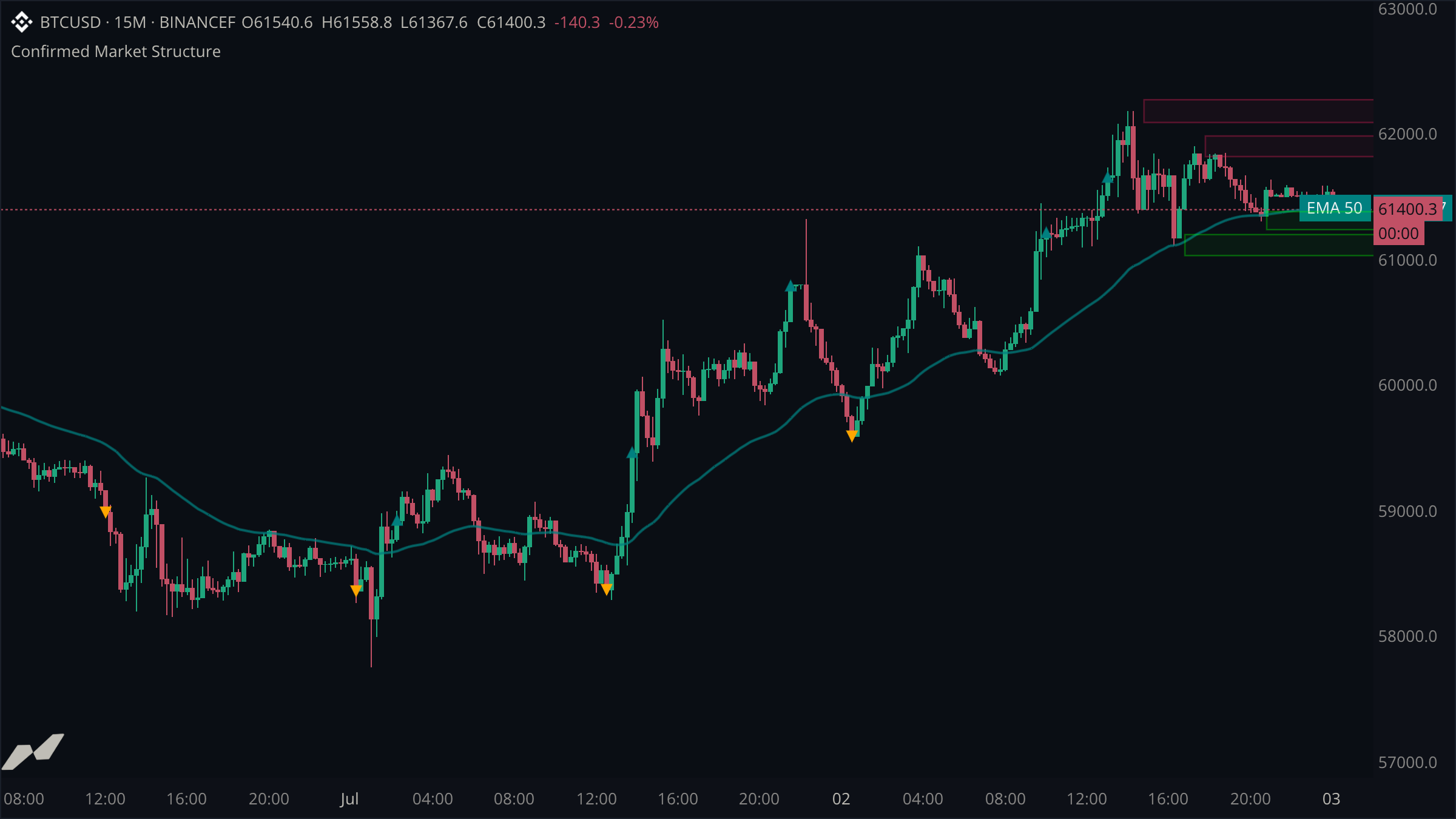
script "Confirmed Market Structure"

type PriceZone {
  top: float
  bottom: float

  fn midpoint() -> float {
    return (self.top + self.bottom) / 2.0
  }
}

fn supplyZone(level: float, width: float) -> PriceZone {
  return PriceZone { top: level + width, bottom: level - width }
}

fn demandZone(level: float, width: float) -> PriceZone {
  return PriceZone { top: level + width, bottom: level - width }
}

data chart = subscribe(data.ohlcv)
data h1 = subscribe(data.ohlcv, timeframe: tf("1h"))

plot trend = plot.line(title: "EMA 50", color: color.withAlpha(color.teal, 190), width: 2)

state (
  zones = entities.boxPool(max: 4)
  breakouts = entities.markerPool(max: 24)
  supply = PriceZone { top: 0.0, bottom: 0.0 }
  demand = PriceZone { top: 0.0, bottom: 0.0 }
  hasSupply = false
  hasDemand = false
  previousClose = 0.0
)

on h1.close {
  let now = h1.time ?? time.fromUnixSeconds(0)
  let width = (h1.atr(14) ?? 0.0) * 0.18

  let high = ta.pivotHigh(h1.high, 2, 2)
  if high != null {
    let start = h1.time[2] ?? now
    supply = supplyZone(high ?? 0.0, width)
    hasSupply = true
    zones.get(start, "supply").set(
      x1: start,
      y1: supply.top,
      x2: now + 24h,
      y2: supply.bottom,
      color: color.withAlpha(color.red, 14),
      borderColor: color.withAlpha(color.red, 105),
      borderWidth: 1.0,
    )
  }

  let low = ta.pivotLow(h1.low, 2, 2)
  if low != null {
    let start = h1.time[2] ?? now
    demand = demandZone(low ?? 0.0, width)
    hasDemand = true
    zones.get(start, "demand").set(
      x1: start,
      y1: demand.top,
      x2: now + 24h,
      y2: demand.bottom,
      color: color.withAlpha(color.green, 13),
      borderColor: color.withAlpha(color.green, 105),
      borderWidth: 1.0,
    )
  }
}

on chart.update {
  trend.plot(ta.ema(chart.close, 50))

  let now = chart.time ?? time.fromUnixSeconds(0)
  let close = chart.close ?? 0.0
  if hasSupply && previousClose <= supply.top && close > supply.top {
    breakouts.get(now).set(
      x: now,
      y: close,
      shape: shape.up,
      color: color.teal,
      size: 4.0,
    )
    hasSupply = false
  }
  if hasDemand && previousClose >= demand.bottom && close < demand.bottom {
    breakouts.get(now).set(
      x: now,
      y: close,
      shape: shape.down,
      color: color.orange,
      size: 4.0,
    )
    hasDemand = false
  }
  previousClose = close
}
Split work by event clock
on h1.close only changes zones after a one-hour candle is confirmed. on chart.update can still update the EMA and detect a breakout immediately. Each handler has one clear job, and neither has to simulate the other's timing.
Keep domain logic readable
PriceZone gives the pair of boundaries a name and a home for related methods. The two constructor functions are deliberately small; in a larger script they are the natural place to add tick rounding or different supply and demand widths.
Reuse drawings by key
The box and marker pools own their capacity and reuse old entries when full. Asking for an entity with get(key) is enough—you do not need an array of drawing IDs or manual recycling code. Supply and demand zones pass a second key part, get(start, "supply") and get(start, "demand"), so a bar that confirms both a pivot high and a pivot low draws two boxes instead of one overwriting the other.