

Plots and panes
Lay out price trend, cumulative delta, open-interest change, and volume delta across three sub-panes.
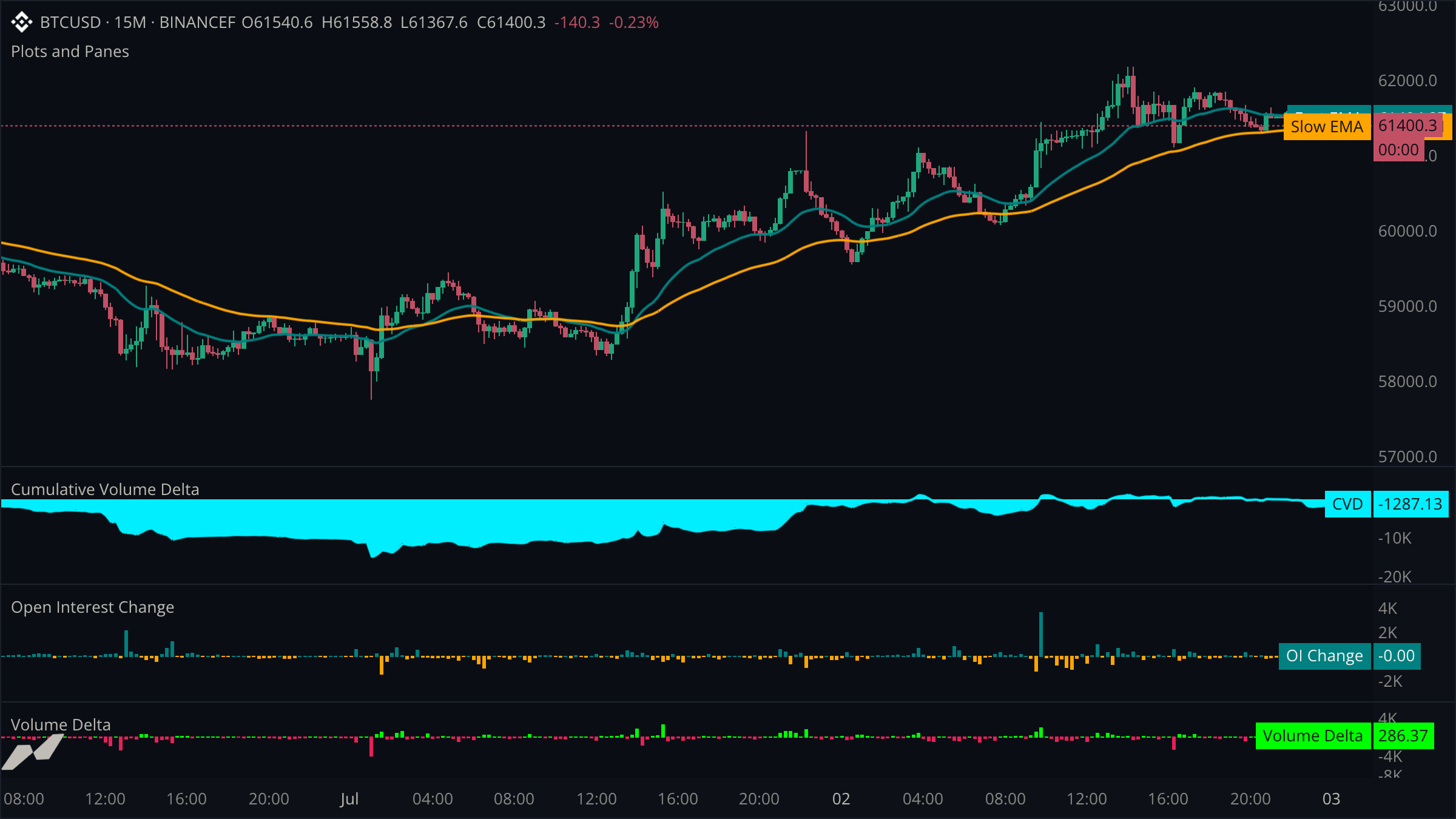
This example combines price trend with three data sources that benefit from independent scales: cumulative volume delta, open-interest change, and volume delta.
script "Plots and Panes"

data chart = subscribe(data.ohlcv)
data cvd = subscribe(data.cvd)
data oi = subscribe(data.oi)
data vd = subscribe(data.vd)

input (
  fastLen = input.int(21, title: "Fast EMA", min: 1, max: 200)
  slowLen = input.int(55, title: "Slow EMA", min: 2, max: 400)
)

pane cvdPane = pane(title: "Cumulative Volume Delta", height: 0.25)
pane oiPane = pane(title: "Open Interest Change", height: 0.25)
pane deltaPane = pane(title: "Volume Delta", height: 0.25)

plot (
  fastPlot = plot.line(title: "Fast EMA", color: color.teal, width: 2)
  slowPlot = plot.line(title: "Slow EMA", color: color.orange, width: 2)
  cvdPlot = plot.line(title: "CVD", color: color.cyan, width: 2, area: true, on: cvdPane)
  oiPlot = plot.histogram(title: "OI Change", on: oiPane)
  deltaPlot = plot.histogram(title: "Volume Delta", on: deltaPane)
)

fill trendCloud = fill.between(fastPlot, slowPlot, color: color.withAlpha(color.teal, 24))

on chart.update {
  fastPlot.plot(ta.ema(chart.close, fastLen))
  slowPlot.plot(ta.ema(chart.close, slowLen))

  cvdPlot.plot(cvd.close)

  let oiChange = ta.change(oi.close, 1)
  oiPlot.plot(oiChange, color: (oiChange ?? 0.0) >= 0.0 ? color.teal : color.orange)

  let delta = vd.close
  deltaPlot.plot(delta, color: (delta ?? 0.0) >= 0.0 ? color.green : color.red)
}
How plots land on a surface
Every plot declaration accepts an on: argument. Leaving it out places the plot on the host price pane, which is where the two EMAs and their fill live. CVD, OI change, and volume delta each name a different pane, and each pane's height is a weight relative to the price pane's 1.0 — three panes at 0.25 leave the price pane roughly four times the height of each.
Per-point colors
A plot's declared color is its default. Passing color: to a plot call overrides it for that bar only. OI change uses teal and orange for expansion and contraction; volume delta uses green and red for net buying and selling.
Give each data source its own scale
CVD is cumulative, OI change is measured in contracts, and volume delta measures aggressive flow. Separate panes keep all three readable without normalizing away their meaning.