

Hourly volume blocks
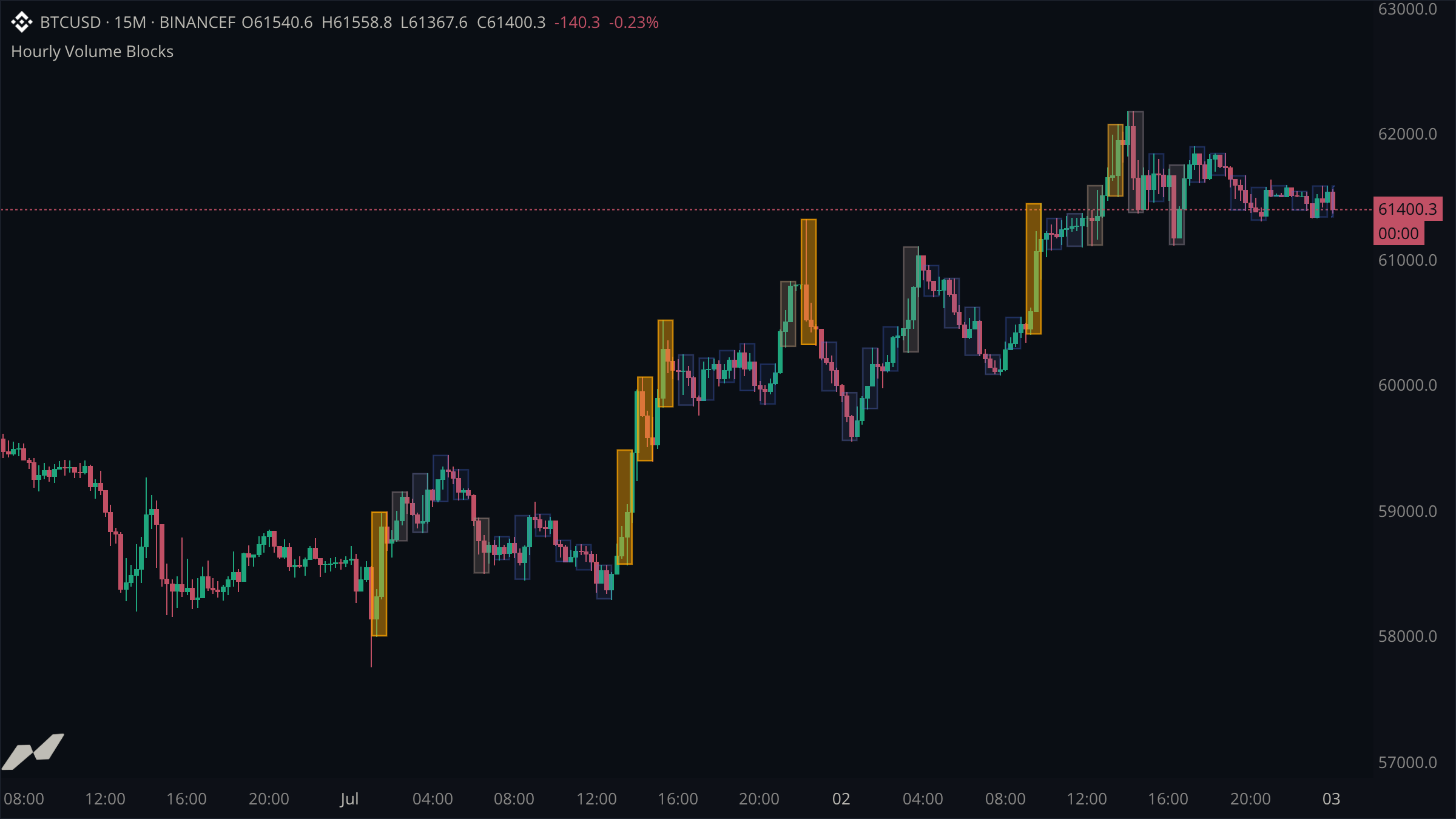
Highlight each hour directly on the candles using volume-weighted box entities.
This example keeps volume attached to the candles it describes. Each UTC hour is wrapped in a box spanning that hour's developing high and low. Quiet hours stay blue and subtle; unusually active hours become warmer and more opaque.
script "Hourly Volume Blocks"

data chart = subscribe(data.ohlcv)
data hourly = subscribe(data.ohlcv, timeframe: tf("1h"))

state blocks = entities.boxPool(max: 48)

on chart.update {
  let now = chart.time ?? time.fromUnixSeconds(0)
  let hourStart = time.floor(now, tf("1h"))
  let barEnd = now + time.bars(1)

  // Compare the developing hour with the last 24 confirmed hourly candles.
  let typicalVolume = ta.sma(hourly.volume, 24)
  let currentVolume = hourly.forming.volume ?? hourly.volume ?? 0.0
  let relativeVolume = typicalVolume != null && (typicalVolume ?? 0.0) > 0.0 ? currentVolume / (typicalVolume ?? 1.0) : 1.0

  // Quiet hours stay subtle. Heavy hours become warmer and more opaque.
  let fillColor = color.gradient(
    relativeVolume,
    0.5,
    2.0,
    color.withAlpha(color.blue, 18),
    color.withAlpha(color.orange, 112),
  )
  let edgeColor = color.gradient(
    relativeVolume,
    0.5,
    2.0,
    color.withAlpha(color.blue, 90),
    color.withAlpha(color.orange, 220),
  )

  // The hour start is also the entity key. Every update grows the same box
  // across the candles belonging to that hour instead of creating new boxes.
  blocks.get(hourStart).set(
    x1: hourStart,
    y1: hourly.forming.high ?? chart.high ?? 0.0,
    x2: barEnd,
    y2: hourly.forming.low ?? chart.low ?? 0.0,
    color: fillColor,
    borderColor: edgeColor,
    borderWidth: 1.0,
  )
}
Keep the context on the chart
The boxes share the chart's time and price axes. You can immediately see which candles formed an active hour, what price range that activity covered, and whether price expanded or stalled inside it.
Read the developing hourly candle
hourly.forming exposes the current one-hour candle while the chart continues updating at its own timeframe. Its volume, high, and low grow throughout the hour. The ordinary hourly.volume series contains confirmed hourly values and supplies the 24-hour comparison average.
Normalize before choosing a color
Raw volume changes considerably between markets. Dividing the developing hour by its recent hourly average produces a portable relative-volume value: 1.0 is typical, values below it are quiet, and values approaching 2.0 are unusually active. color.gradient maps that value into both hue and opacity.
Reuse one box per hour
time.floor(now, tf("1h")) returns the start of the current UTC hour. That timestamp is both the box's left edge and its entity key. Every chart update retrieves the same box and extends it to the current candle's end, so one hour creates one visual object rather than a new object on every bar.
The developing box can change until the hour closes. Earlier boxes remain fixed because their higher-timeframe candles are confirmed.