

Viewport-anchored market HUD
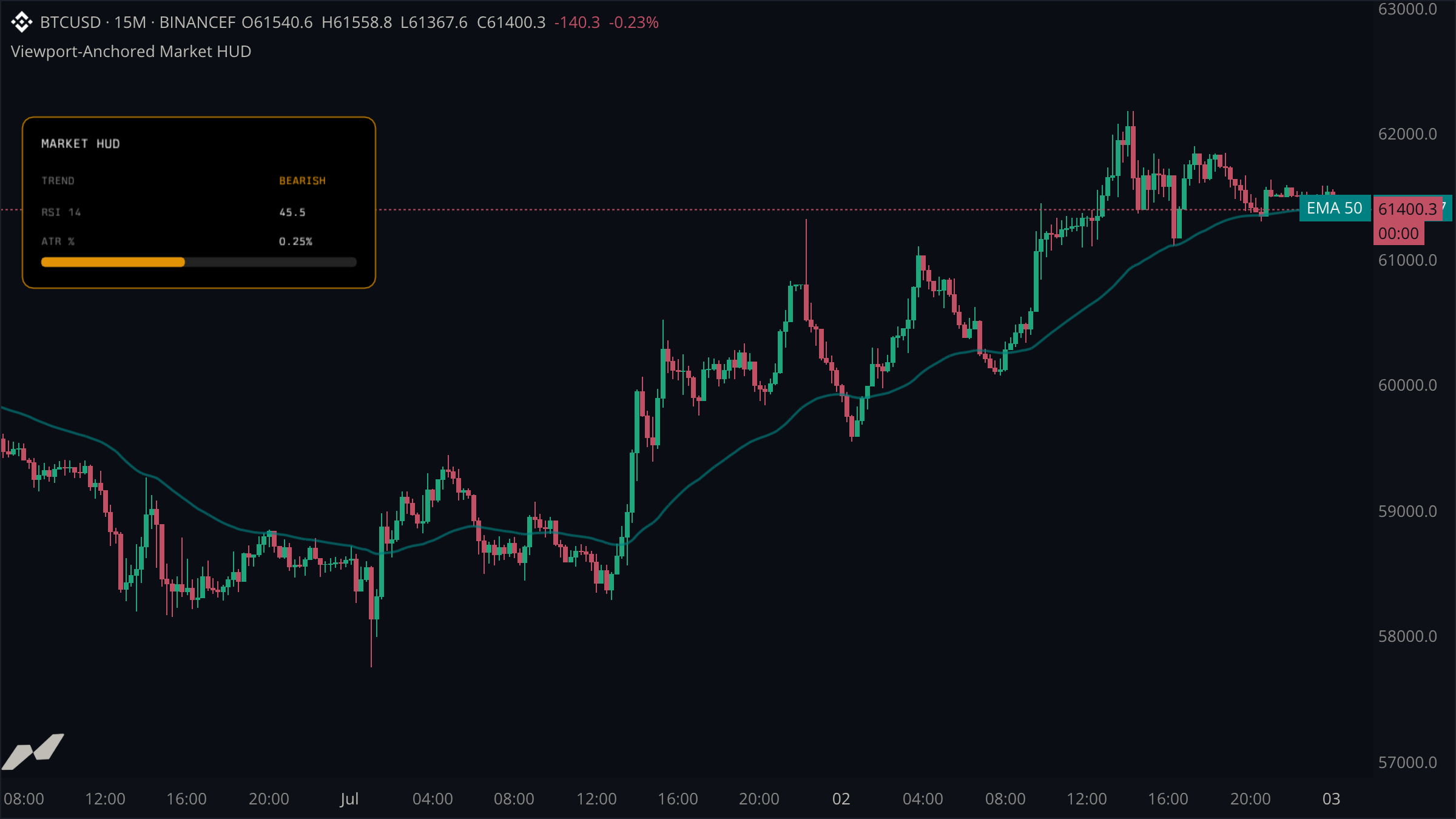
Build a fixed market-information card that remains in the same pane corner as the chart pans and zooms.
Viewport anchors use pixel offsets from a pane edge instead of candle time and price. That makes them suitable for status cards, compact legends, watermarks, and heads-up displays.
script "Viewport-Anchored Market HUD"

data chart = subscribe(data.ohlcv)

plot trend = plot.line(title: "EMA 50", color: color.withAlpha(color.teal, 165), width: 2.0)

state (
  panels = entities.boxPool(max: 3, anchor: anchor.topLeft)
  labels = entities.labelPool(max: 8, anchor: anchor.topLeft)
)

on chart.update {
  let close = chart.close ?? 0.0
  let average = ta.ema(chart.close, 50) ?? close
  let bullish = close >= average
  let accent = bullish ? color.teal : color.orange
  let rsi = ta.rsi(chart.close, 14) ?? 50.0
  let atrPct = close != 0.0 ? (chart.atr(14) ?? 0.0) / close * 100.0 : 0.0

  trend.plot(average)

  panels.get("card").set(
    x1: 18.0,
    y1: 96.0,
    x2: 310.0,
    y2: 238.0,
    rounding: 9.0,
    color: color.withAlpha(color.black, 255),
    borderColor: color.withAlpha(accent, 190),
    borderWidth: 1.0,
    zIndex: 10,
  )
  panels.get("meter-bg").set(
    x1: 34.0,
    y1: 212.0,
    x2: 294.0,
    y2: 220.0,
    rounding: 4.0,
    color: color.withAlpha(color.gray, 70),
    zIndex: 11,
  )
  panels.get("meter").set(
    x1: 34.0,
    y1: 212.0,
    x2: 34.0 + 260.0 * math.clamp(rsi / 100.0, 0.0, 1.0),
    y2: 220.0,
    rounding: 4.0,
    color: color.withAlpha(accent, 220),
    zIndex: 12,
  )

  labels.get("title").set(
    x: 34.0, y: 111.0, text: "MARKET HUD", color: color.white,
    size: 13.0, font: font.mono, textAlign: "left", zIndex: 13,
  )
  labels.get("trend-key").set(
    x: 34.0, y: 143.0, text: "TREND", color: color.gray,
    size: 11.0, font: font.mono, textAlign: "left", zIndex: 13,
  )
  labels.get("trend-value").set(
    x: 230.0, y: 143.0, text: bullish ? "BULLISH" : "BEARISH", color: accent,
    size: 11.0, font: font.mono, textAlign: "left", zIndex: 13,
  )
  labels.get("rsi-key").set(
    x: 34.0, y: 169.0, text: "RSI 14", color: color.gray,
    size: 11.0, font: font.mono, textAlign: "left", zIndex: 13,
  )
  labels.get("rsi-value").set(
    x: 230.0, y: 169.0, text: str.format("{0:.1}", rsi), color: color.white,
    size: 11.0, font: font.mono, textAlign: "left", zIndex: 13,
  )
  labels.get("atr-key").set(
    x: 34.0, y: 193.0, text: "ATR %", color: color.gray,
    size: 11.0, font: font.mono, textAlign: "left", zIndex: 13,
  )
  labels.get("atr-value").set(
    x: 230.0, y: 193.0, text: str.format("{0:.2}%", atrPct), color: color.white,
    size: 11.0, font: font.mono, textAlign: "left", zIndex: 13,
  )
}
Choose one anchor for the whole component
Both pools use anchor.topLeft, so every coordinate is a pixel offset from the same origin. The card remains fixed while chart time, price range, and zoom change underneath it.
Compose a component from pooled entities
The main card and two meter boxes come from one box pool. Text comes from a label pool. Stable keys update each piece in place on every chart update.
Keep data coordinates and screen coordinates separate
The EMA remains a normal time-and-price plot. Only the information card uses viewport coordinates, which avoids accidental movement or scaling with the market.