

Multi-timeframe terminal
Show chart-timeframe trend beside a complete four-hour candle and momentum workspace.
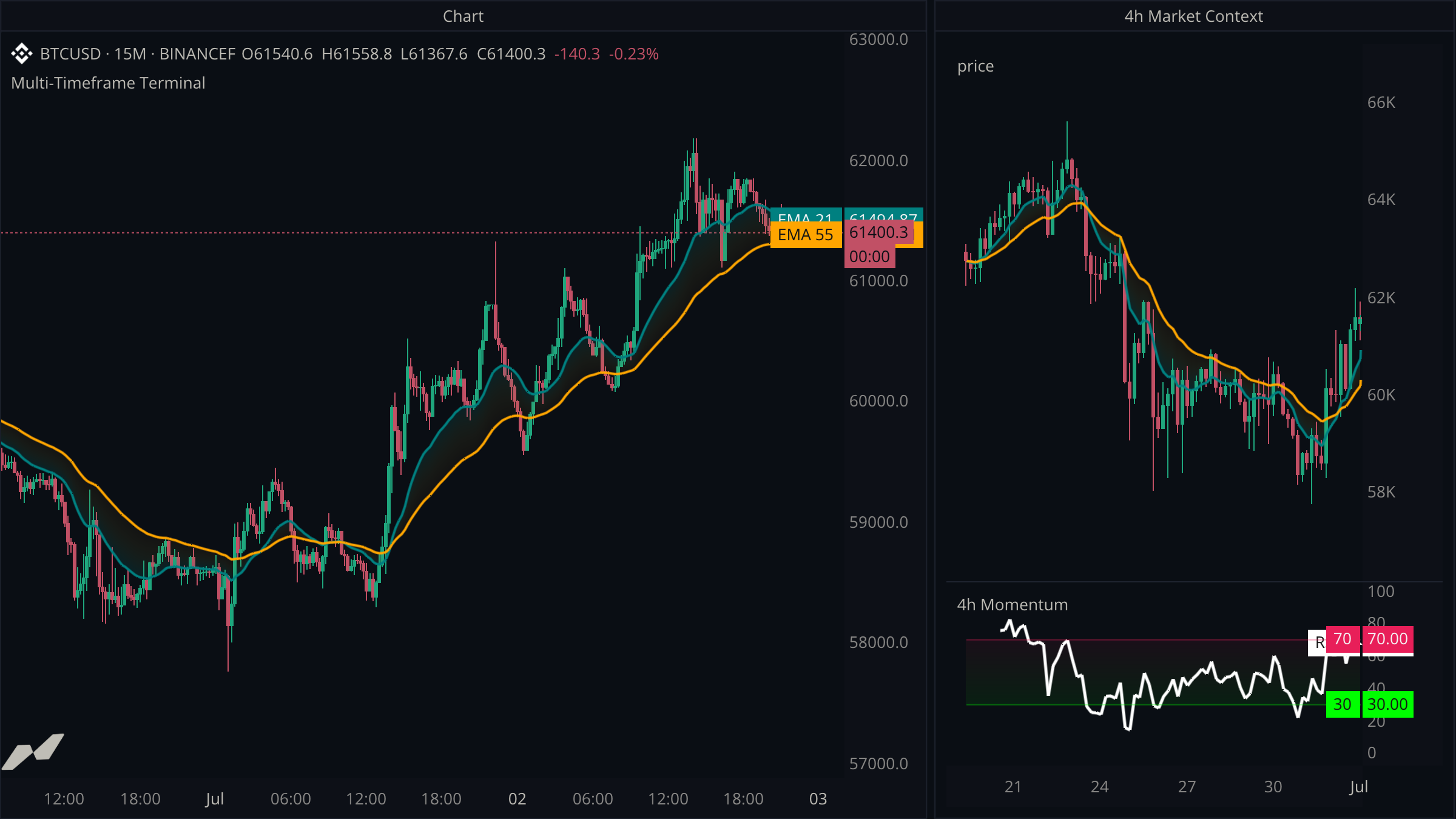
This example puts a four-hour chart in a second window. The main 15-minute chart shows its own trend, while the second window shows four-hour candles, averages, and momentum.
script "Multi-Timeframe Terminal"

data chart = subscribe(data.ohlcv)
data h4 = subscribe(data.ohlcv, timeframe: tf("4h"))

window context = window(title: "4h Market Context") {
  price: chart.panel(h4, title: "4h Price"),
}

pane momentum = pane(title: "4h Momentum", height: 0.28, on: context.price)

plot (
  fast = plot.line(title: "EMA 21", color: color.teal, width: 2.0)
  slow = plot.line(title: "EMA 55", color: color.orange, width: 2.0)

  h4Bars = plot.candle(title: "4h Candles", showLabel: false, showValue: false, on: context.price)
  h4Fast = plot.line(
    title: "4h EMA 8",
    color: color.teal,
    width: 2.0,
    showLabel: false,
    showValue: false,
    on: context.price,
  )
  h4Slow = plot.line(
    title: "4h EMA 21",
    color: color.orange,
    width: 2.0,
    showLabel: false,
    showValue: false,
    on: context.price,
  )
  h4Rsi = plot.line(title: "RSI 7", color: color.white, width: 2.5, on: momentum)
  overbought = plot.line(title: "70", color: color.withAlpha(color.red, 100), on: momentum)
  oversold = plot.line(title: "30", color: color.withAlpha(color.green, 100), on: momentum)
)

fill hostTrendCloud = fill.between(fast, slow)
fill h4TrendCloud = fill.between(h4Fast, h4Slow)
fill h4RsiBand = fill.between(overbought, oversold)

on chart.update {
  let fastValue = ta.ema(chart.close, 21)
  let slowValue = ta.ema(chart.close, 55)
  fast.plot(fastValue)
  slow.plot(slowValue)
  hostTrendCloud.fill(
    topValue: fastValue,
    bottomValue: slowValue,
    topColor: color.withAlpha(color.teal, 44),
    bottomColor: color.withAlpha(color.orange, 8),
  )
}

on h4.close {
  let fastValue = ta.ema(h4.close, 8)
  let slowValue = ta.ema(h4.close, 21)
  h4Bars.plot(h4.open, h4.high, h4.low, h4.close)
  h4Fast.plot(fastValue)
  h4Slow.plot(slowValue)
  h4TrendCloud.fill(
    topValue: fastValue,
    bottomValue: slowValue,
    topColor: color.withAlpha(color.teal, 52),
    bottomColor: color.withAlpha(color.orange, 10),
  )
  h4Rsi.plot(ta.rsi(h4.close, 7))
  overbought.plot(70.0)
  oversold.plot(30.0)
  h4RsiBand.fill(
    topValue: 70.0,
    bottomValue: 30.0,
    topColor: color.withAlpha(color.red, 18),
    bottomColor: color.withAlpha(color.green, 18),
  )
}
Let every subscription drive its own outputs
The chart averages and their gradient fill update on chart.update. Four-hour candles, averages, trend cloud, and RSI only update in on h4.close, so all outputs in the context window share one confirmed four-hour clock. The render loads fourteen days of history, giving the RSI and moving averages enough earlier candles to remain visible across essentially the whole higher-timeframe chart.
Attach panes to the intended chart panel
on: context.price gives the RSI pane the same window and time axis as the four-hour chart panel. Plot declarations then target either the panel or its attached pane.
Render the source as candles
chart.panel(h4) supplies the panel's event clock. plot.candle supplies its visible OHLC series, which also allows the script to recolor or transform those candles later.
Footprint cells
Draw a bid x ask footprint and a delta profile inside each bar with a cells plot, keep the candles visible beside it, and choose how the numbers are written.
Higher and lower timeframe confluence
Combine genuine one-minute impulse with the active 15-minute chart and confirmed one-hour trend.