

Market decision dashboard
Turn price, momentum, volatility, volume, open interest, and CVD into a readable table beside the chart.
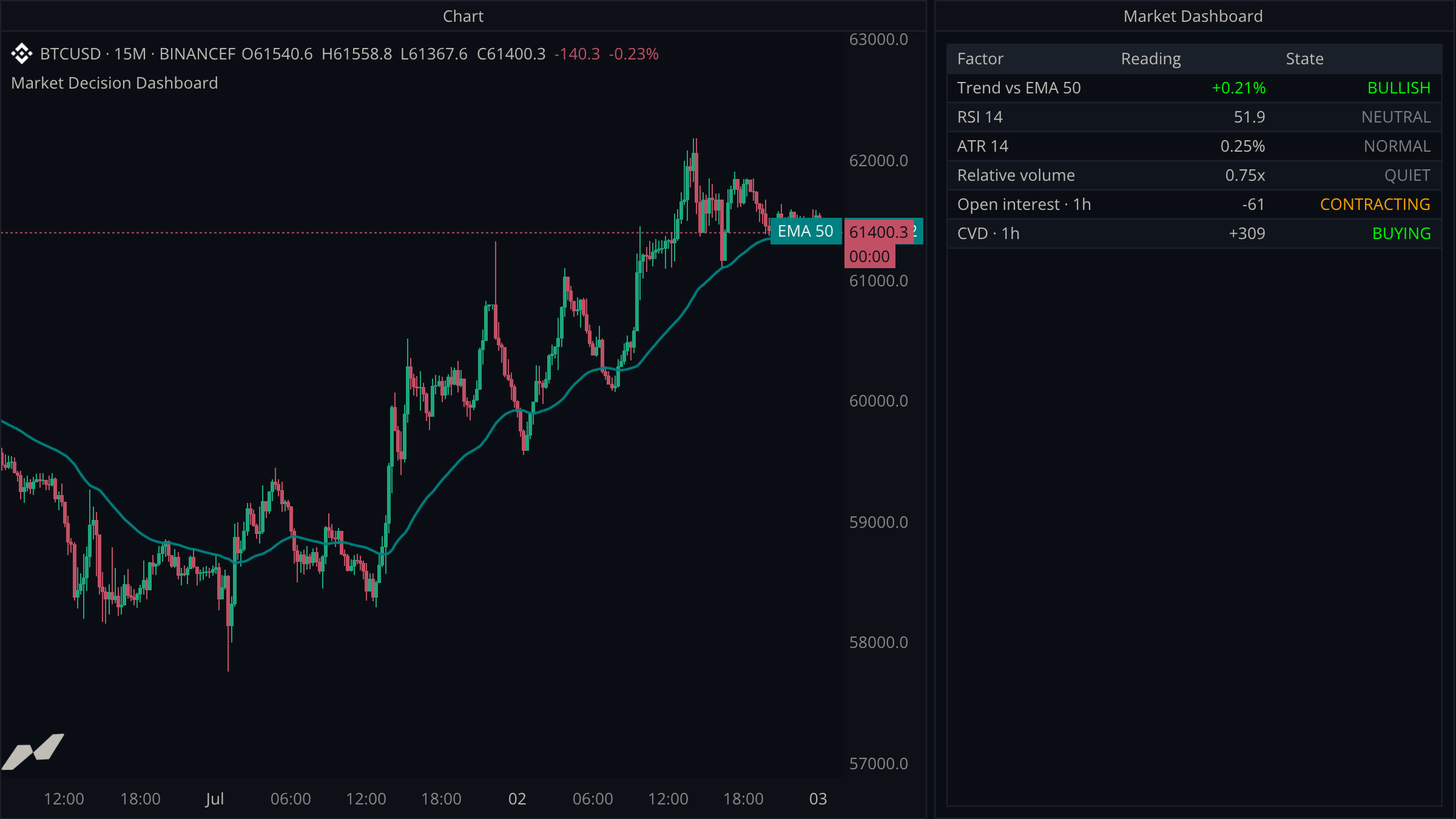
A table is most useful when it condenses several related inputs into decisions. This example builds a compact market dashboard beside the chart and uses cell styling to make the important states easy to scan.
script "Market Decision Dashboard"

data chart = subscribe(data.ohlcv)
data oi = subscribe(data.oi, timeframe: tf("15m"))
data cvd = subscribe(data.cvd, timeframe: tf("15m"))

window dashboard = window(title: "Market Dashboard") {
  signals: table.new([
    table.col(title: "Factor"),
    table.col(title: "Reading", align: align.right),
    table.col(title: "State", align: align.right),
  ], title: "Decision Board", capacity: 8),
}

plot trend = plot.line(title: "EMA 50", color: color.teal, width: 2.0)

on chart.close {
  let close = chart.close ?? 0.0
  let average = ta.ema(chart.close, 50) ?? close
  let trendPct = average != 0.0 ? (close / average - 1.0) * 100.0 : 0.0
  let bullish = close >= average

  let rsi = ta.rsi(chart.close, 14) ?? 50.0
  let momentumState = rsi >= 60.0 ? "STRONG" : (rsi <= 40.0 ? "WEAK" : "NEUTRAL")
  let momentumColor = rsi >= 60.0 ? color.green : (rsi <= 40.0 ? color.red : color.gray)

  let atrPct = close != 0.0 ? (chart.atr(14) ?? 0.0) / close * 100.0 : 0.0
  let volumeAverage = ta.sma(chart.volume, 20) ?? 1.0
  let relativeVolume = volumeAverage != 0.0 ? (chart.volume ?? 0.0) / volumeAverage : 0.0
  let oiChange = ta.change(oi.close, 4) ?? 0.0
  let cvdChange = ta.change(cvd.close, 4) ?? 0.0

  trend.plot(average)

  dashboard.signals.row("1", "Trend vs EMA 50",
    table.cell(str.format("{0:+.2}%", trendPct), fg: bullish ? color.green : color.red),
    table.cell(bullish ? "BULLISH" : "BEARISH", fg: bullish ? color.green : color.red))
  dashboard.signals.row("2", "RSI 14", str.format("{0:.1}", rsi),
    table.cell(momentumState, fg: momentumColor))
  dashboard.signals.row("3", "ATR 14", str.format("{0:.2}%", atrPct),
    table.cell(atrPct >= 0.65 ? "EXPANDED" : "NORMAL", fg: atrPct >= 0.65 ? color.orange : color.gray))
  dashboard.signals.row("4", "Relative volume", str.format("{0:.2}x", relativeVolume),
    table.cell(relativeVolume >= 1.2 ? "ACTIVE" : "QUIET", fg: relativeVolume >= 1.2 ? color.teal : color.gray))
  dashboard.signals.row("5", "Open interest · 1h", str.format("{0:+.0}", oiChange),
    table.cell(oiChange >= 0.0 ? "EXPANDING" : "CONTRACTING", fg: oiChange >= 0.0 ? color.teal : color.orange))
  dashboard.signals.row("6", "CVD · 1h", str.format("{0:+.0}", cvdChange),
    table.cell(cvdChange >= 0.0 ? "BUYING" : "SELLING", fg: cvdChange >= 0.0 ? color.green : color.red))
}
Fix the table's schema during setup
table.new declares the columns, alignment, and capacity once. Every row then follows the same three-cell shape: factor, numeric reading, and interpreted state.
Update rows by stable key
Keys such as "1" and "2" determine row identity and ordering. Calling row again replaces that row, so the dashboard always represents the latest closed candle without growing over time.
Pin the horizons you label
data.oi and data.cvd default their timeframe to the host chart's period, and ta.change counts bars on its source's clock — so an unpinned ta.change(oi.close, 4) would mean four chart bars, not one hour. Subscribing both at tf("15m") keeps the · 1h rows honest on any chart.
Style meaning, not decoration
The reading remains neutral unless its sign is important. Color is concentrated in the state column, where it helps distinguish bullish, bearish, active, and contracting conditions.
Higher and lower timeframe confluence
Combine genuine one-minute impulse with the active 15-minute chart and confirmed one-hour trend.
Strategy runner template
Build a reusable long-and-short paper strategy with deterministic backtesting, live marking, fees, leverage, liquidation, a trade ledger, and a fixed HUD.