

Liquidity profile workstation
Plot rolling POC and value area on price while rendering per-price buy and sell imbalance in a second window.
This workstation turns volume data into three complementary views: rolling profile levels on the chart, hourly activity by day, and normalized per-price imbalance.
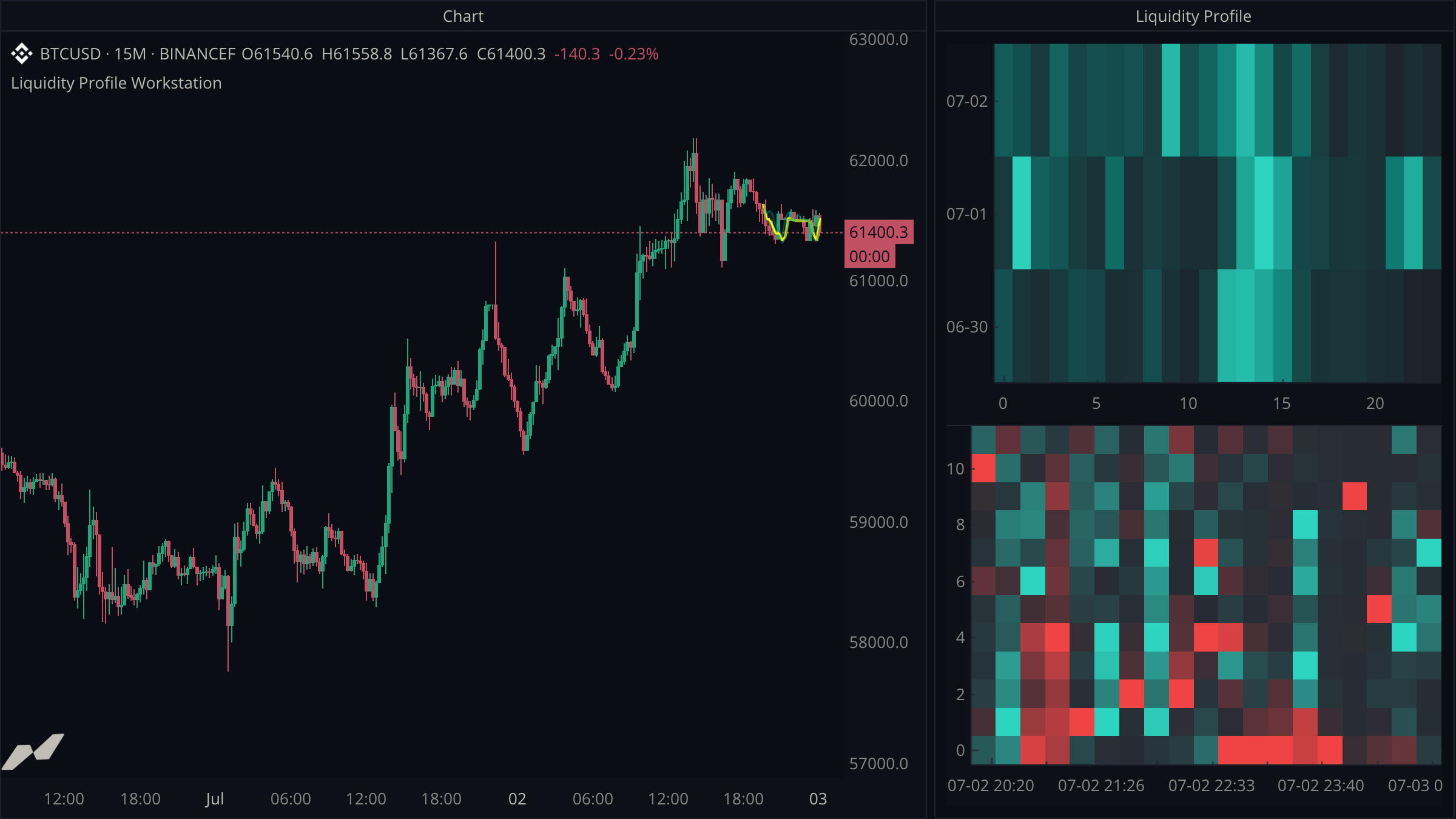
script "Liquidity Profile Workstation"

data chart = subscribe(data.ohlcv)
data volume = subscribe(data.volume)

window liquidity = window(title: "Liquidity Profile") {
  activity: heatmap.new(
    title: "Hourly Volume by Day",
    x: axis.index,
    y: axis.category,
    capacity: 168,
    palette: [
      color.rgb(28, 34, 42),
      color.rgb(15, 118, 110),
      color.rgb(45, 212, 191),
    ],
  ),
  profile: heatmap.new(
    title: "Sell Imbalance  ←  Price Buckets  →  Buy Imbalance",
    x: axis.time,
    y: axis.index,
    capacity: 65536,
    min: -1.0,
    max: 1.0,
    palette: [
      color.rgb(239, 68, 68),
      color.rgb(39, 44, 52),
      color.rgb(45, 212, 191),
    ],
  ),
}

plot (
  poc = plot.line(
    title: "16-bar POC",
    color: color.yellow,
    width: 2.0,
    showLabel: false,
    showValue: false,
  )
  vah = plot.line(
    title: "70% VAH",
    color: color.withAlpha(color.teal, 150),
    showLabel: false,
    showValue: false,
  )
  val = plot.line(
    title: "70% VAL",
    color: color.withAlpha(color.teal, 150),
    showLabel: false,
    showValue: false,
  )
)

fill valueArea = fill.between(vah, val)

state (
  hourlyVolume = map<string, float>(168)
  dayKeys = rolling<string>(168)
  hourNums = rolling<int>(168)
  columns = rolling<time>(400)
)

on chart.close {
  let gap: float? = null
  let profile = volume.profile(bars: 16)
  let point = profile.poc()
  let area = profile.valueArea(70.0)

  poc.plot(point != null ? point.price : gap)
  vah.plot(area != null ? area.highPrice : gap)
  val.plot(area != null ? area.lowPrice : gap)
  if area != null {
    valueArea.fill(
      topValue: area.highPrice,
      bottomValue: area.lowPrice,
      topColor: color.withAlpha(color.teal, 38),
      bottomColor: color.withAlpha(color.cyan, 8),
    )
  }

  let timestamp = chart.time ?? time.fromUnixSeconds(0)
  let day = time.format(timestamp, "{MM}-{DD}")
  let hour = time.hour(timestamp)
  let hourKey = str.format("{0}:{1}", day, hour)
  if !hourlyVolume.has(hourKey) {
    let expiredDay = dayKeys.push(day)
    let expiredHour = hourNums.push(hour)
    if expiredDay != null && expiredHour != null {
      let _ = hourlyVolume.delete(str.format("{0}:{1}", expiredDay, expiredHour))
      liquidity.activity.set(expiredHour, expiredDay, null)
    }
  }
  let accumulated = (hourlyVolume.get(hourKey) ?? 0.0) + (chart.volume ?? 0.0)
  hourlyVolume.set(hourKey, accumulated)
  liquidity.activity.set(hour, day, accumulated)

  let buckets = profile.buckets(12)
  if buckets != null {
    let largest = 0.0
    for bucket in buckets {
      largest = math.max(largest, math.abs(bucket.delta))
    }

    let expiredColumn = columns.push(timestamp)
    if expiredColumn != null {
      for bucket in buckets {
        liquidity.profile.set(expiredColumn, bucket.index, null)
      }
    }

    for bucket in buckets {
      let imbalance = largest > 0.0 ? bucket.delta / largest : 0.0
      liquidity.profile.set(timestamp, bucket.index, imbalance)
    }
  }
}
Query a rolling profile
volume.profile(bars: 16) merges the last 16 chart-aligned volume profiles. poc() and valueArea(70.0) then provide the familiar levels without manual scans.
Show enough activity to compare days
The upper heatmap groups volume by hour and calendar day. The lower heatmap shows the price detail for each bar.
capacity limits the number of cells; it does not remove old cells automatically. Adding a map entry or heatmap cell beyond the limit stops the script. The dayKeys and hourNums collections track insertion order so the script can remove the oldest hour from both the map and heatmap once it holds a week of data.
Normalize each profile column
Raw volume changes throughout the day. Dividing each bucket's delta by the largest absolute delta in its column gives the heatmap a consistent -1.0 to 1.0 color scale. This makes profile shapes easier to compare.
Each bar adds 12 cells with a new timestamp. The columns collection keeps the last 400 timestamps. Before adding a column, the script removes the expired column with set(x, y, null). Without this cleanup, it would reach the 65,536-cell limit after about 5,461 bars and stop.
Use a separate window for a separate visual model
POC and the gradient-filled value area remain on the host chart. The two-dimensional activity views belong in a heatmap window where their axes and palettes can be configured for each kind of comparison.
Intrabar order flow
React to individual large trades, annotate the candle that received them, and aggregate signed volume by chart bar.
Footprint cells
Draw a bid x ask footprint and a delta profile inside each bar with a cells plot, keep the candles visible beside it, and choose how the numbers are written.